

Lorem ipsum dolor sit amet, consectetur adipiscing elit, sed do eiusmod tempor incididunt ut labore et dolore magna aliqua. Ut enim ad minim veniam, quis nostrud exercitation ullamco laboris nisi ut aliquip ex ea commodo consequat. Duis aute irure dolor in reprehenderit in voluptate velit esse cillum dolore eu fugiat nulla pariatur.
Block quote
Ordered list
Unordered list
Bold text
Emphasis
Superscript
Subscript
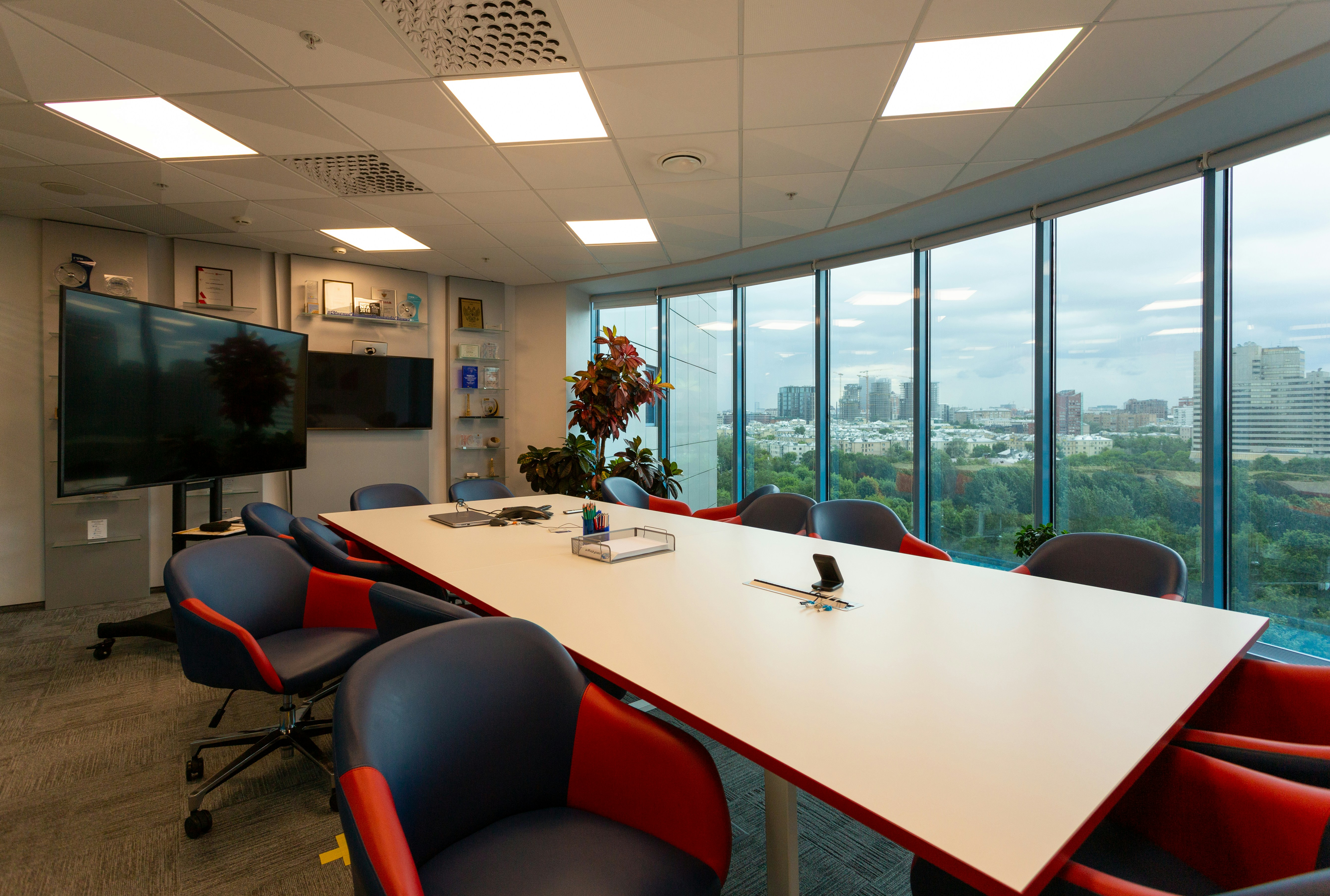
The perfect meeting room comes down to making your decisions in the right order: room type first, then platform, physical equipment, collaboration surface, delivery partner and, last of all, handover. Keep to that order and the video call starts at the press of a button, remote colleagues can be heard, and your operations team does not have to treat every room as a one-off. GHT-SYS is a Hungary-based audiovisual (AV) systems integrator. We build corporate meeting rooms from the survey through design, installation and programming to handover, and, if you ask us to, we keep them running afterwards with SLA-based maintenance.
This guide gives the order of those decisions, a short answer for each step and a link to the article that goes into detail. It is written for IT workplace and unified communications and collaboration (UCC) leads, facilities managers and procurement teams: people setting a meeting room standard, moving offices or requesting installation quotes.
Why rethink meeting rooms now? Because meetings have changed in the last few years, and the room has to keep up. Microsoft’s June 2025 Work Trend Index special report found that nearly a third of meetings now span multiple time zones, and that 57% are ad hoc calls without a calendar invite (Microsoft WorkLab). The data comes from anonymised Microsoft 365 telemetry and excludes EU and education tenants. These are not Hungarian figures, then, but they show the trend.
The direction is clear: anyone should be able to start a meeting in the room at any time, without preparation.
In short: Building a meeting room means six decisions that build on one another, and their order matters. If you start with a device or a platform demo, you typically end up fitting the room to the device. At handover, ask for a commissioning test report and documentation, because these prove the system works, and ask for training so that your colleagues can actually use it. Sometimes the right decision is not to build yet.
A meeting room build involves six decisions, made in this order: room type, communications platform, physical AV equipment, collaboration surface, delivery partner and handover. The order is fixed because each decision sets the limits of the next one. The room type determines the equipment, the platform narrows the hardware choice, and the room’s complexity decides whether you need an outside AV partner.
Microsoft starts with the room as well. Its Teams Rooms deployment guidance says that before ordering equipment you should review your meeting spaces to establish the style of meetings held there and the equipment that fits. It also says to make sure each site is ready in terms of power, networking and furniture (Microsoft Learn, Deployment overview, last updated 21 January 2026).
It is like renovating a flat. First you decide what each room is for, then come the cables in the walls and the tiling, and only at the very end the light fittings. Buy the lights first and you end up rerouting the wiring to suit them, and having to break into the tiling a second time.
The first decision in a meeting room build is to sort your rooms into categories by size and use, because the same device can be flawless in one room and unusable in another. Across the GHT-SYS meeting room article series we work with three size bands: huddle rooms (2-4 people), medium-sized rooms (5-10 people), and large meeting rooms or boardrooms (more than 10).
Headcount is one axis. The other is use: regular hybrid meetings, presentations, joint creative work or receiving clients. An eight-person room where people present twice a week needs different equipment from a project room of the same size that hosts a hybrid call three times a day.
In practice, you record each room’s capacity, its typical meeting type and how many remote participants usually join. That list becomes your room standard. Many rooms, few room types. One equipment package per category, reused for every new room.
Control rooms and spaces in continuous operation follow a different design logic, to which these categories only partly apply.
The equipment list for each room type is in the hybrid meeting room system guide.
Whether a meeting room gets Microsoft Teams Rooms or Zoom Rooms depends on the IT environment the organisation already runs. In a Microsoft 365 environment, Teams Rooms fits in with identity, calendar and device management. Where most meetings take place on Zoom, Zoom Rooms means less friction day to day. A vendor demo tells you little. Your calendar system, and how many invitations arrive from other platforms, tell you far more.
The platform narrows the hardware as well. Both platforms run their own device certification programmes, so choose devices certified for your platform.
With Teams Rooms, the licence tier is also part of the platform decision, because Basic and Pro licences differ in how the rooms can be managed. According to Microsoft’s licensing page, features such as remote configuration, peripheral health management, device analytics and Microsoft Entra Conditional Access policies come only with Pro. The number of Basic licences per organisation is also capped (Microsoft Learn, Teams Rooms licensing, last updated 14 August 2026). For a handful of rooms this is a minor item. With twenty or thirty rooms, it decides whether IT can monitor the rooms’ peripherals remotely or someone has to walk over.
Which platform and which licence suit your number of rooms, and how does a Teams room join a Zoom meeting? We work through both in our Teams Rooms vs Zoom Rooms comparison.
How well a hybrid meeting works is decided by the camera, microphones and display that go into the meeting room, and by the room’s acoustics. The platform works with whatever sound and picture the room captures, and anything the capture missed cannot be added later.
There is an order inside the room too: microphone coverage and acoustics first, then the camera angle, and the display size last. Why start with sound? Because if remote participants cannot follow what is said around the table, the meeting falls apart, however sharp the picture. In a glass-walled room with hard surfaces, even a more expensive microphone does little good, because it picks up the reflections off the walls along with the speech.
In a small room an integrated video bar is usually enough. Larger meeting rooms need a dedicated microphone system, and the largest also need programmed control. At GHT-SYS our designs are vendor-independent: we match the camera and the microphones to how big the room is and what it is used for.
Where do the boundaries between room sizes lie, and how do you test the remote participant’s experience in fifteen minutes? Our hybrid meeting room article covers both.
An interactive whiteboard or other interactive surface earns its place in a meeting room when joint sketching, annotation or hybrid workshops happen there regularly. Presentation and status-meeting rooms only need a good-quality display with wireless sharing from a laptop. It costs less, and it is simpler to maintain.
An interactive surface pays off under two conditions: the way the room is used justifies it, and it is connected to the platform and file system the team works in anyway. If it is not connected, the shared sketch tends to stay on the board, and nobody can find it after the meeting. If the use does not justify it, the expensive device ends up as a plain display.
We cover interactive whiteboards in the office in a separate article: when they are worth it, what the realistic alternative is, and how to test in two weeks whether your team would use one.
A meeting room build should go to your internal IT team or to an AV systems integrator, depending on how complex the room is. An experienced internal IT team can set up a simple, plug-and-play huddle room, but a boardroom with programmed control or a divisible room needs an AV specialist. Where the line falls depends on the room type and how complex the chosen equipment is, which is why this decision comes after the first four.
The Zoom Rooms Design Guide likewise separates rooms an internal team can build from designs that need industry experts (Zoom, Zoom Rooms Design Guide). Our phase-by-phase installation guide shows how this shapes the project.
If you choose an outside partner, ask them these questions. The answers tell you a lot about the quotes:
If there is a large price gap between two quotes, compare the answers to the first two questions first.
We give the full set of criteria (what to ask, what counts as a good answer, what is a red flag) in our guide to choosing a meeting room AV integrator.
At the handover of a meeting room you should receive three things: the commissioning test report, as-built documentation and user training. The test report proves that the system works, and the documentation means that a year from now someone will still know what is in the rack.
Handover is the fourth and final phase of the project. The four phases are survey and design; installation and programming; commissioning and testing; handover and training. The ANSI/AVIXA D402.02:2013 (R2024) standard provides a framework for verifying system performance (AVIXA, Audiovisual Systems Performance Verification).
Ask for the test report to be part of the handover documentation, with an itemised checklist and the measured values, and for the training to take place in the room your colleagues will actually use. If this verification is skipped, the first fault will most likely be spotted during a client meeting.
What should you get in each phase, and what exactly do you sign at handover? See meeting room installation from design to handover. After handover comes day-to-day operation: response times, preventive visits, an equipment inventory. All of this belongs in a well-written meeting room maintenance SLA.
A new meeting room build should wait while the teams and meeting types that will use the room are still unknown, or while the office refit’s electrical and network plans are not yet agreed. It should also wait when the current complaints stem from an existing system that works badly. In all three cases it is cheaper to wait or to repair than to buy new.
If your way of working is still undecided, a few weeks of room usage data is worth more than a quick purchase. Data first, then equipment.
If the office refit is still under way, time the meeting room technology to the architectural plans. A cable added to a finished wall, or a display that has to be moved, is like asking for a socket behind tiles that are already laid: it always costs more than waiting would have.
If your existing meeting rooms freeze, the remote party cannot be heard, or nobody knows what is in the rack, the first step is to stabilise and document the system you already have. We have collected the typical causes of outages in our article on why meeting room audio systems and displays go down. If a restart no longer helps, go through the five signs your meeting room AV needs more than a restart.
This table lists the six meeting room decisions in order and works as a worksheet. Go through it row by row with your own rooms and you end up with a draft room standard, plus the article that goes deeper on each question.
| Step | What you decide | Which article goes deeper |
|---|---|---|
| 1. Room type | How many meeting rooms you have, their size (2-4, 5-10, 10+ people) and their use | Hybrid meeting room system |
| 2. Platform | Teams Rooms or Zoom Rooms, and at which licence tier | Teams Rooms vs Zoom Rooms |
| 3. Physical equipment | Which camera, microphones, display and acoustic treatment each category needs | Hybrid meeting room system |
| 4. Collaboration surface | Which rooms need an interactive surface, and where a display and wireless screen sharing will do | Interactive whiteboards for the office |
| 5. Delivery partner | Internal IT or an AV systems integrator, and how you compare the quotes | Choosing a meeting room AV integrator |
| 6. Handover | Which test report, documentation and training you receive, and who runs the system afterwards | Meeting room installation process |
If you are just starting, you can fill in the first two rows in-house. You need a list of rooms, the data from your room booking system, and a conversation with IT about which platform is primary and how many external meetings run on other platforms.
From the third row onwards, an AV specialist’s view pays off, because the choice of equipment decides what the room will cost. Internal IT can take rooms built from a manufacturer’s standard kit all the way through, but rooms with programmed control and divisible rooms need specialist design. If your room list is ready before you first sit down with a partner, the first meeting can be about the standard, not the inventory.
A meeting room is designed for discussions and today is typically equipped for video conferencing, whereas a conference room is usually a larger space for presentations, events or divisible use. That is why it usually needs programmed control and a professional sound system, though the two terms are sometimes used interchangeably. With a divisible conference room you also have to decide how audio and video work with the room both opened up and divided.
A meeting room build should start with a survey of your existing and planned rooms: how many there are, how big they are, what meetings they host and how many remote participants join. A simple spreadsheet with one row per room is enough. Platform and equipment come after that.
Meeting rooms do not need identical equipment: standardise them by category, not with a single package for the whole office. If every room gets the same kit, the small rooms end up oversized and the large ones undersized. The right answer is one standard equipment package per size and use category, so your operations team only needs to know a few room types.
A meeting room build decision should involve IT, the facilities team and an AV specialist, because a meeting room is a network endpoint, part of the building and an AV system at the same time. Microsoft’s Teams Rooms deployment guidance also advises working with your network, facilities and AV teams so that deployment dependencies are met. Bring procurement in once the room standard exists, because until then there is nothing to compare.
A smart room is a meeting room in which video conferencing, the display, the audio and often the lighting, blinds or room booking all run from one shared control interface. In a simple video conferencing room these are separate devices with separate controls. Behind the shared interface sits programmed control, which is why a smart room needs an AV specialist.
Ádám Horváth is the managing director, founding owner and a systems engineer at GHT-SYS.
About GHT-SYS: GHT-SYS is a Hungary-based audiovisual (AV) systems integrator. The company designs, installs and commissions integrated AV systems in Hungary and across Europe, and provides SLA-based maintenance for corporate clients in Hungary. If you are stuck at one of the six steps, or would like to turn your room list into a room standard, book a consultation.
Related articles:


